When a Data Change Is a Production Deployment
Your code ships through branches, reviews, and one-click reverts. Then someone edits a database row and production changes with none of that protection. Here is the three-gate discipline we use to give data changes code-grade safety, and the audit trail it produces on its own.
Talk to an EngineerThe Deployment Your Git Workflow Cannot See
Software teams have spent twenty years building rails around the act of changing a live system. Code moves through branches, pull requests, automated tests, and staged deployments, and when something goes wrong a revert is one click away. That apparatus exists because everyone agrees changing production is dangerous. It is the most mature discipline in software delivery, and it has one enormous blind spot.
On a large class of systems - content platforms, commerce catalogs, CRMs, anything configuration-driven - the behavior your customers experience is only half-written in the repository. The other half lives in a database: prices, page layouts, product data, permission flags, workflow rules. Edit one of those rows and you have changed production exactly as surely as a deploy does. But the change rides none of the rails. There is no branch, no reviewer, no test run, and often no durable record that anything happened at all.
We have written about giving every code branch of a static site its own preview URL, and about doing the same for dynamic sites by standing up a running replica per branch. Both of those work because the thing being previewed can be rebuilt from source. This piece is about the third case, the one that cannot fork: live data. There is one copy. It is production. And everyone - editors, integrations, automation - changes it in place.
Why "Just Use Staging" Is Half an Answer
The reflex answer is to copy the database somewhere safe and test there, and anyone who has operated the copy knows how that goes. A working catalog or content database changes many times an hour, so the copy starts drifting the moment it lands. Refreshing it is a heavy, disruptive job that teams manage monthly at best, and if the data contains anything personal, every refresh smears regulated information across a lower environment that was never in scope for protecting it. The copy is expensive, stale, and occasionally a liability in its own right.
The honest configuration many mature teams land on - including us, on the website you are reading - is that staging shares the production database. Staging exists to exercise new code against real content, which is exactly what you want when code is the thing changing. But it quietly inverts the safety promise: a content or data change made "on staging" is made everywhere, instantly. "Test it on staging first" is a true sentence about code and a false one about data.
So the data cannot be branched and cannot be convincingly faked. Teams that handle this well stop trying to make data behave like code and instead give data changes their own rails: the same three guarantees the code pipeline provides - a way back, a scoped and reviewed change, and proof it worked - achieved by different means. We think of them as three gates.
The Three Gates: Snapshot, Surgical Change, Verify
Gate one is a restore point created at the moment of the change and named for it. Gate two is making the change through an interface that can only touch what it names, and that keeps a revision. Gate three is verifying what actually rendered to the person on the other end, not what you intended to change. None of the three is exotic, and that is rather the point: together they give a database edit the same safety profile as a pull request, without pretending the database is a repository.
The rest of this page walks through each gate the way we run it in production - on client platforms and on this site, including the week this page itself was written.
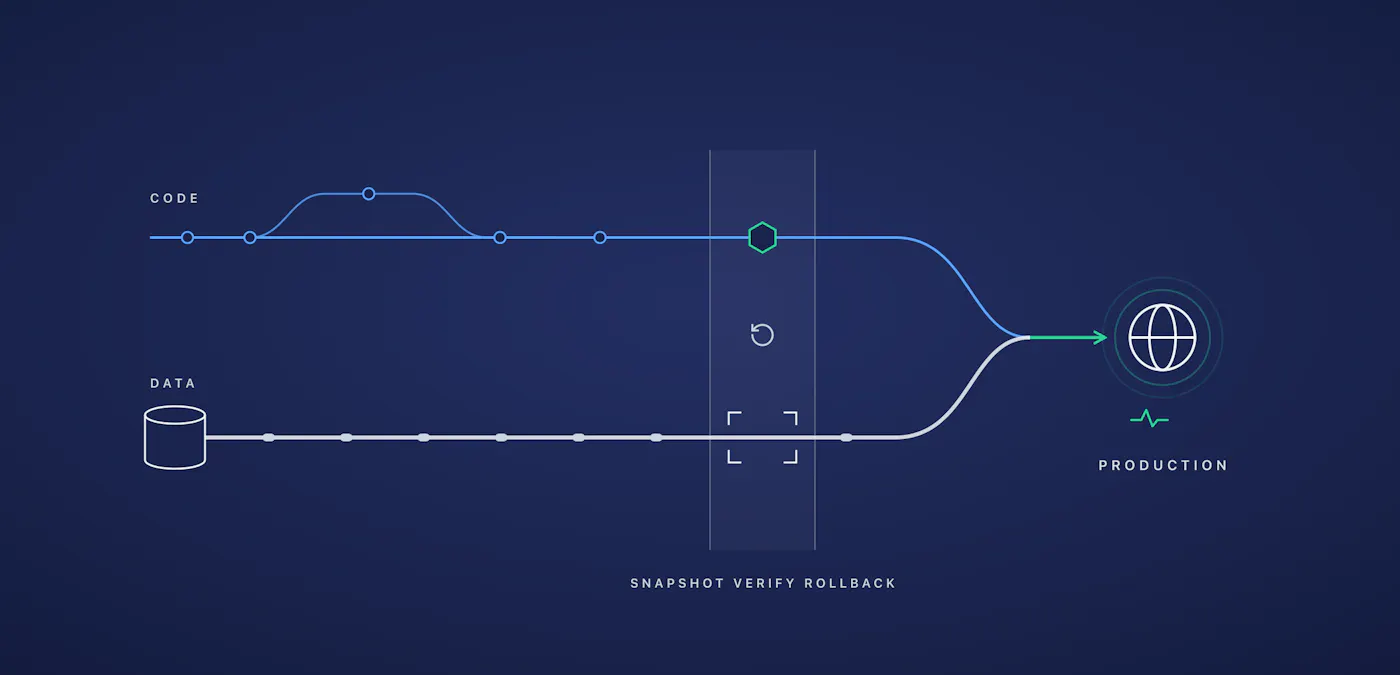
Code can branch and retry; data cannot fork. The checkpoint band - snapshot, verify, rollback - is what lets the two rails arrive in production together safely.
Gate One: A Restore Point, Named for the Change
Nightly backups are table stakes, and they are not this gate. A nightly backup answers the question "what did the system look like last night," which is the wrong question when a batch job misbehaves at two in the afternoon. The gate is a snapshot taken seconds before the change and named after it, so that the undo path is one obvious step instead of an archaeology project through generic backup timestamps.
A concrete example from the morning this page was written: before importing thirty-four client quotes into this site's testimonial pool, the operator created a database snapshot described "Pre-quote-pool-import" at 13:58. The import ran at 13:59. Had it gone sideways, recovery would have been a restore of a one-minute-old snapshot whose name says exactly why it exists. It took seconds to create and costs effectively nothing to keep, which removes the last excuse for skipping it.
Gate Two: Changes That Can Only Touch What They Name
The standard tools for changing data are dangerously broad. A person in an admin screen can touch anything the screen shows. A SQL statement with a careless WHERE clause can touch everything at once. The gate is an interface that inverts that default: it addresses exactly one record or one component, merges only the fields named in the request, validates the result before committing anything, and stores a revision so the previous state is one call away.
On our platforms this takes the form of a REST layer over the page-builder data. A change request names a single widget on a single page and carries only the fields it intends to set; everything else is structurally untouched. It behaves like a small pull request - scoped, diffable, and individually reversible - and because it is an authenticated API call rather than a shared admin login, every change carries an identity. Below is what one gated change actually looks like from the operator's terminal.
Gate Three: Verify What Rendered, Not What You Meant
A correct database row is not a correct page. Between the row and the reader sit an object cache, a rendering layer, and a content delivery network, and each of them is perfectly capable of serving yesterday. So the third gate treats every change as unverified until the caches are flushed, the CDN is invalidated, and the live page - the thing an actual visitor receives - has been read back and checked. On top of that runs a regression suite in a real browser: element assertions and screenshot comparisons across the site's critical pages, executed after every content increment.
We run the browser-rendered version of this gate because the cheaper version failed us. In June, a batch edit that adjusted headings across nine of this site's pages also silently rebuilt each page's layout geometry, flattening the custom column widths on two of them. Every check we ran at the time read the served HTML and pronounced the change clean; the damage only existed once JavaScript assembled the layout in the browser, and a person noticed it before our tooling did. The screenshot-comparison suite exists because of that afternoon. The question the gate asks is not "did the change apply" but "does the page a customer sees still look right."
What This Looks Like in a Working Week
In the three days before this page was published, this site shipped five substantial pages - including an account of running WordPress at a million visitors and the engineering story behind an Azure Marketplace certification - imported those thirty-four testimonials, uploaded a series of diagrams with structured metadata, and re-pointed navigation menus. That is dozens of production data changes on a live business site in seventy-two hours. Every one of them went through the gates: a named snapshot ahead of each batch, every layout edit through the widget API, the regression suite green after each increment. Over the six weeks this operating rhythm has been in place, the site's Ahrefs health score has climbed from 18 to 96 - not despite the ceremony but because of it, since the gates are what made the pace survivable.
Here is the part worth pausing on: much of that work was executed by an AI operator with access to the repository, the gates, and the environments. That is not a flourish; it is the argument. When every change is snapshotted before it lands, scoped to exactly what it names, and verified as rendered, the speed of the operator stops being the risk factor. The gates do not care whether the hands on the keyboard are human. That is what real change control means: you can hand the keys to something that moves very fast, watch the gates hold, and keep a complete record of everything that happened.
The Audit Trail You Did Not Have to Assemble
When a SOC 2 auditor examines change management, the questions are always the same four: who made the change, was it authorized, what exactly did it touch, and could you have rolled it back. For code, two decades of git history and CI records answer instantly. For data, most organizations produce an admin activity log that shows something happened - which is not the same as showing it was controlled.
Run the three gates and the evidence assembles itself as a byproduct of doing the work. The snapshot is a timestamped artifact named for the change. The API revision records the exact fields touched, the before and after states, and the authenticated identity behind the request. The verification run produces timestamped assertions and screenshots. Nobody sat down to write documentation; the control produced its own proof. Our guide to SOC 2 compliance for websites covers the broader framework, but change management is the section where database-backed platforms most often quietly fail, and it is the one this discipline closes. For the regulated and government-adjacent organizations we serve as a service-disabled veteran-owned small business, that difference is frequently the difference between passing and remediating.
When You Do Not Need Any of This
If your content lives in git - a documentation site, a headless setup where editors commit markdown and the site compiles - then your data already is code, the preview-environment playbook covers it end to end, and building database gates would be solving a problem you do not have. The same goes for a small brochure site with one careful editor: the platform's built-in revision history plus a nightly backup is an entirely defensible posture, and we would tell you so.
The discipline earns its cost when three things start being true: several hands - human or automated - share the same live data, mistakes are visible to customers or expensive to unwind, and someone outside the team eventually asks you to prove your changes are controlled. Two out of three is usually the tipping point. Past it, the question is no longer whether data changes deserve deployment discipline, but how long you can keep pretending they are not deployments.
Array
The delivery practice this page belongs to, one layer at a time.
Preview Environments for Static Sites
Where the delivery story starts: every branch of a static site gets its own URL.
Preview Environments for Dynamic Sites
A running replica per branch, for systems with a server and a database behind them.
The GitOps automation platform that runs our repositories, gates, and environments.
WordPress at a Million Visitors
The architecture side of operating a database-backed platform under real traffic.
What attack traffic against a database-backed platform actually looks like, by the numbers.
SOC 2 Compliance for Your Website
The compliance framework this discipline feeds evidence into.
"
Talk to an Expert
Connect with our diverse group of UDX experts that can help you implement successful DevOps practices within your organization.