WordPress at a Million Visitors

Yes, WordPress can handle it. The question is whether your architecture can. Here is the stack we run in production, and where sites actually break first.

Talk to an Engineer

The Short Answer

WordPress is rarely the bottleneck, and that surprises people. A PHP process rendering a page is one of the cheapest operations in your stack. What actually fails under load is the architecture wrapped around it: a single origin server answering every request personally, media files chained to one machine's disk, a database absorbing traffic that a cache should have answered. The platform gets blamed for decisions the platform never made.
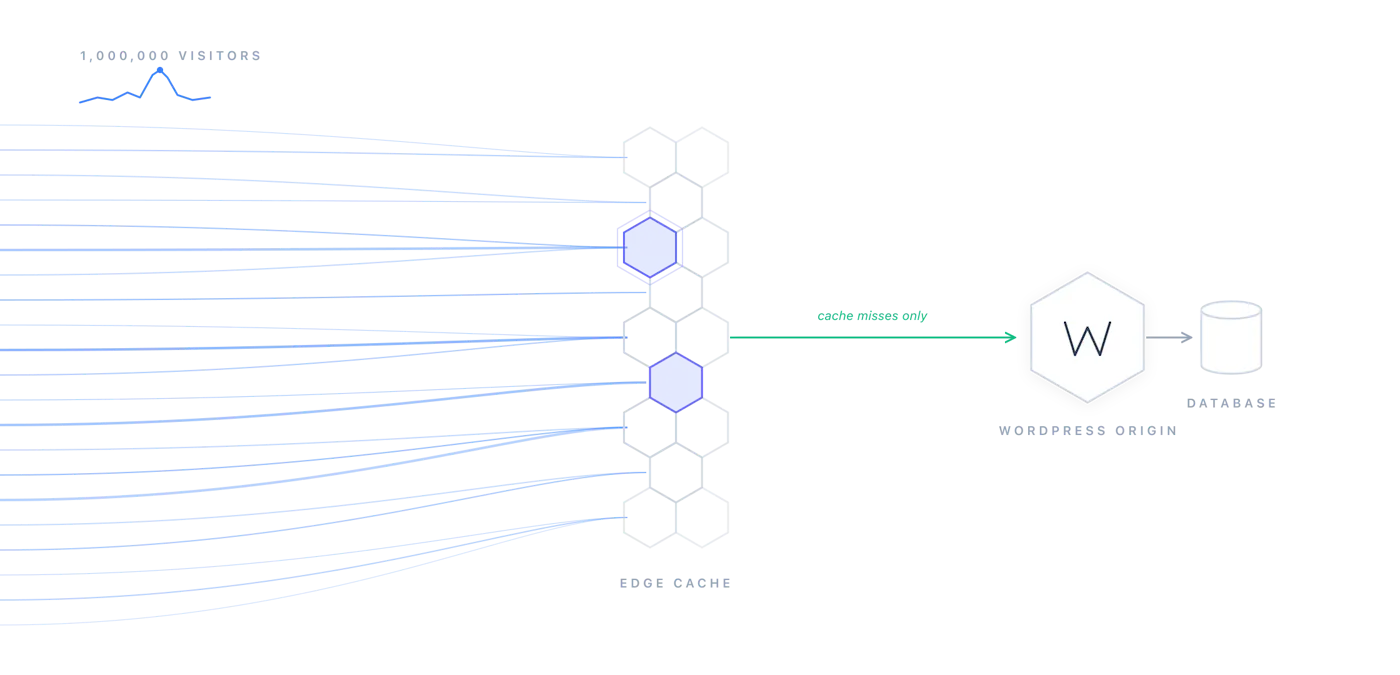
Get those decisions right and the same WordPress codebase that wheezes at fifty thousand monthly visitors will serve millions without drama. We say that with some confidence because we run this architecture ourselves, and we run it for clients whose traffic does not arrive politely: ticket on-sales for live events, where a quiet Tuesday becomes a six-figure request spike in the space of a few minutes.

One honest caveat before the diagrams, because it will save some readers the rest of the page: if your traffic is steady and modest, and an hour of downtime costs you little, you do not need any of this. A good managed host is the right answer for most sites, and pretending otherwise is how agencies sell Kubernetes to bakeries. This page is for the sites where the graph goes vertical, the stakes are real, and "we'll upgrade the plan" has stopped working.

What a Month of Traffic Actually Looks Like

Scaling plans tend to imagine a million human visitors arriving with good intentions. The logs tell a stranger story. We analyzed thirty days of CloudFront traffic for this site, 575,092 requests and 13.84 gigabytes served, and a remarkable share of it was not human at all. More than 62,000 requests arrived with no user agent, and about half were blocked outright. Another 27,851 came from curl, the bulk of it automated probing: seventeen thousand of those requests hammered paths that do not exist, hunting for exposed backups and login endpoints, and scanners methodically enumerated the user APIs of every WordPress membership plugin on the market against a site that runs none of them.

Then there is the newest constituency: AI crawlers. Bytespider, ByteDance's crawler, made 1,824 requests and pulled 147 megabytes on its own; ClaudeBot followed at 1,329. This category barely existed a few years ago and now shows up in every log review we do, which means your architecture is serving an audience your analytics never shows you.

Traffic category30-day volumeWhat we do with it
All requests575,092 (13.84 GB)The baseline: everything below is inside this
No user agent62,783About half blocked outright; the rest watched
curl and scripted probes27,851Mostly scanner noise; 17,000+ hit paths that do not exist
Bytespider (ByteDance)1,824 requests, 147 MBSteered with robots.txt, served from edge cache
ClaudeBot1,329 requestsSame: robots.txt rules, edge cache absorbs it
SEO crawlers (Ahrefs, MJ12)Previously blockedUnblocked: we want these visiting

Two design consequences follow. First, a meaningful slice of your capacity will always be spent on non-humans, so the economics matter: a bot absorbed by a CDN cache costs you fractions of a cent, while the same bot reaching PHP occupies a worker a paying customer could have used. Let the edge do that work. Second, blunt instruments cut both ways. Our own firewall rules turned out to be silently blocking the SEO crawlers we very much wanted visiting, and we have since found robots.txt to be a far finer instrument for steering AI bots than user-agent blocking ever was.

The Architecture That Holds

Edge first. The organizing principle of this architecture is that most requests should be answered before they ever reach WordPress. A CDN like CloudFront serves anonymous page views, assets, and feeds straight from cache at the edge, which means your origin only meets the traffic that genuinely needs PHP: logged-in users, carts, form submissions, and the occasional cache miss. At scale, the ratio is dramatic, and every request the edge absorbs is capacity you did not have to build.

A stateless application tier. The WordPress containers themselves hold nothing of value: no uploads on disk, no local sessions, nothing that makes one server special. That discipline comes straight from the twelve-factor playbook, and it is what makes horizontal scaling possible at all, because any pod can serve any request, and the cluster can add or remove them without ceremony.

Diagram of stateless processes communicating without shared local state, from the twelve-factor app model

Media off the server. Uploads belong in object storage, not on a web server. Our WP-Stateless plugin moves WordPress media to Google Cloud Storage, and with 469,000+ downloads it has been battle-tested well beyond our own client work. An image CDN serves and resizes from the bucket, and your application tier never touches a media file again.

Horizontal autoscaling on managed Kubernetes. We run multi-zone clusters on GKE, deployed from Git with Rabbit. When a spike hits, the cluster adds pods; when it passes, they drain away, and nobody is provisioning a server at two in the morning. The operational cadence matters as much as the automation: cluster upgrades roll through gradually, control planes in minutes and large node pools over the better part of an hour, and we schedule them early in the week, never on a Friday.

Diagram of horizontal scaling adding identical application processes to absorb load

The database behind a shield. With the edge absorbing reads and object storage handling media, the database is left with the work only it can do: writes and genuinely dynamic queries. Persistent object caching keeps the repetitive queries out entirely, which is the difference between a database that hums through a traffic spike and one that becomes the evening's incident channel. Good telemetry tells you which one you have before your customers do.

Diagram of Kubernetes cluster components across master and worker nodes

What Breaks First

The encouraging thing about WordPress scaling failures is how predictable they are. After enough launches, you stop being surprised and start keeping a list. Ours, roughly in the order sites hit them:

Uploads on local disk is almost always first. The moment a second server exists, media written to one is missing from the other, and the support tickets begin. This is why stateless media is the first move in the architecture, not a refinement for later. Its smaller sibling, PHP sessions on disk, produces the same split-brain in miniature; sessions belong in the object cache or, better, designed away entirely.

Cache stampedes arrive next: a popular page expires and a thousand concurrent requests all volunteer to regenerate it at once, briefly turning your cache into a denial-of-service tool aimed at your own database. Request coalescing at the edge and deliberate cache lifetimes solve it, but only if someone decided them before launch day. WP-Cron compounds the problem at the worst moments, because WordPress fires scheduled tasks on visitor requests by default, which means your heaviest maintenance jobs run precisely during your busiest hours. Move cron to the cluster scheduler, where it can run heavy work on nobody's time but its own.

And then there is the plugin you forgot about: one modest-looking plugin writing to the options table on every page view will happily hold a database lock through your biggest traffic hour of the year. The lesson is to load-test the site you actually run, production plugins and all, rather than the clean install that exists nowhere. If this list reads uncomfortably like a diagnosis of your own site, that is precisely what our enterprise WordPress work exists for.

A Cache Lesson We Paid For

A war story from this very site, offered as evidence that the cache humbles everyone eventually. Our frontend is React running against WordPress as a headless CMS, and it fetches each page a second time with a query flag to retrieve its layout data as JSON. CloudFront, quite correctly, treats every query-string variant as its own cached object. We shipped a layout fix, invalidated the page URL, confirmed the HTML was fresh, and watched the page continue to render wrong anyway, because the invalidation had purged the page but not its JSON twin, and the application kept hydrating from the stale copy. Nothing violated the rules we had given the CDN. The rules simply were not the ones we believed we had written.

The takeaway is worth generalizing: enumerate your cache keys before you need them, know every variant your application requests, invalidate with wildcards, and verify with the exact requests your code makes rather than the ones a human makes in a browser. At a million visitors, the cache is not an optimization layered onto your architecture. It is the architecture, and its configuration deserves the same rigor as code.

Go Deeper

Array

The pieces of this architecture, and where we write about running them.

WP-Stateless

WordPress media on Google Cloud Storage. 469,000+ downloads.

Rabbit

GitHub-to-Kubernetes GitOps deployment automation.

Enterprise WordPress Media

Media management and protection at enterprise scale.

Government WordPress

The same architecture, with public-sector compliance.

CloudNative WordPress

Managed cloud-native WordPress hosting by UDX.

The DevOps Manual

How we think about automation, monitoring, and delivery.

"

Talk to an Expert

Connect with our diverse group of UDX experts that can help you implement successful DevOps practices within your organization.