Blocking WP2Shell: A Play-by-Play of AI-Driven Incident Response

What Happened, in One Session

While a live attack campaign against the WP2Shell vulnerability chain was ramping up across WordPress sites we operate, two new firewall rules went from an infrastructure-as-code commit to enforcement across our fleet in 38 minutes. Every remaining site was covered within the hour, and origin traffic to the vulnerable endpoint dropped to zero.

No consoles were clicked. No servers were SSH'd into. No one pasted credentials into a chat window. An AI coding assistant — Kimi Code CLI — drove our infrastructure-as-code repository through the same GitOps process a human engineer would use: branch, pull request, plan-only validation, code review, merge, apply, verify.

This is the play-by-play, with the real numbers — including the part where a different AI assistant kept flagging our own defensive work as a cybersecurity risk and getting in the way. If you read our plain-language explainer on WP2Shell, think of this as the incident-room sequel.

The Attack, by the Numbers

Before touching anything, we pulled five days of CloudFront logs for every site we operate and counted. What looked like background noise turned out to be an escalating campaign aimed squarely at the REST API batch endpoint (/wp-json/batch/v1), the front door of the WP2Shell chain:

DomainAttack requestsExecuted (207)
icamiami.org10,0336,093
financialsocialwork.com3,5421,936
destinationpickleball.com3,4482,001
energync.com2,5691,293
getmogumogu.com2,2901,571
seasiderestorationchs.com2,1341,103
getsappealoe.com1,316658
udx.io1360


Both request forms combined. The udx.io row is worth a second look: 136 attack requests, zero executed — not luck, but existing hardening. Its REST API sits behind authentication, so the batch endpoint never ran for anonymous traffic. Compensating controls that are in place before an incident are the cheapest kind.

Around those numbers: the daily volume ramped 1 → 17 → 128 → 319 → 202 across Jul 17–21, peaking at 3,756 requests in a single hour. The tooling announced itself — user agents wp2shell (×105) and wp-audit (×21), exploitation toolkits, not browsers. And one rented VPS, 147.135.76.247 (OVH US, Reston VA), sent 3,748 of the 3,756 requests in the peak wave while rotating browser user agents to look like ordinary traffic, then probed /wp-login.php 110 times — exactly what an attacker does after creating an admin account.

Two things made this urgent. The traffic was doubling day over day, and live probes confirmed several sites were answering exploit-shaped requests with HTTP 207 — meaning the batched sub-requests were being executed, not rejected. Patching WordPress everywhere was the real fix, but a fleet-wide core update takes coordination. We needed a compensating control at the edge, and we needed it immediately.

The Fix Went Through the Front Door

The one ground rule, stated up front: the AI does not touch AWS directly. It could read anything; it could change nothing. Every modification had to flow through the same infrastructure-as-code pipeline our human changes use.

The stopgap itself was small — two byte_match rules added to the shared Web ACL that sits in front of the fleet, covering both forms of the endpoint:

RuleMatchesAction
block-wp-rest-batch-pathURI path contains /wp-json/batch/v1Block (403)
block-wp-rest-batch-queryQuery string contains rest_route=/batch/v1 (URL-decoded)Block (403)


.rabbit/infra_configs/production/aws-waf.yml
        # WP2Shell stopgap (CVE-2026-63030): block the REST API batch endpoint fleet-wide.
        # Covers both request forms: /wp-json/batch/v1 path and ?rest_route=/batch/v1 query.
        # Batch only accepts POST and is unused by anonymous traffic; remove after WP core
        # is patched to 6.8.6 / 6.9.5 / 7.0.2 across tenants.
        - name: "block-wp-rest-batch-path"
          priority: 7
          type: "byte_match"
          action: "block"
          byte_match_statement:
            search_string: "/wp-json/batch/v1"
            field_to_match: "uri_path"
            positional_constraint: "CONTAINS"
            text_transformations:
              - priority: 0
                type: "LOWERCASE"
        - name: "block-wp-rest-batch-query"
          priority: 8
          type: "byte_match"
          action: "block"
          byte_match_statement:
            search_string: "rest_route=/batch/v1"
            field_to_match: "query_string"
            positional_constraint: "CONTAINS"
            text_transformations:
              - priority: 0
                type: "URL_DECODE"
              - priority: 1
                type: "LOWERCASE"

Everything around those two lines of YAML is the part that matters: GitOps incident response pipeline: seven stages from reading attack logs through pull requests, plan-only CI validation, code review, merge and apply, to verified zero origin requests
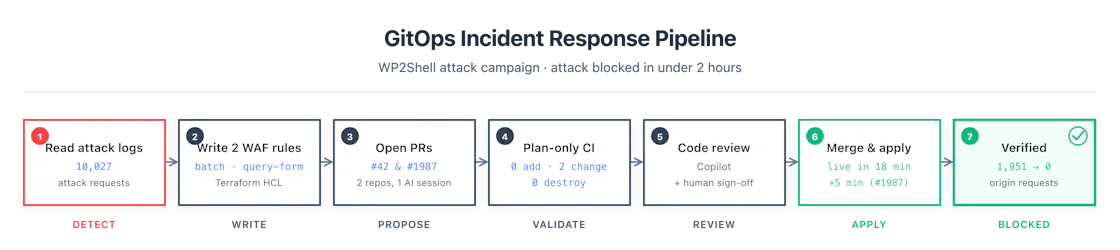
Pull requests, not consoles. The change went in as one PR against the shared WAF ACL covering the fleet, one against ICA Miami’s, with byte-identical rules.

Plan-only validation before merge. Each PR triggered a read-only OpenTofu plan against live state: 0 add / 2–4 change / 0 destroy — the WAF change plus some pre-existing drift the assistant caught and explained line by line (a container image rollback we accepted, a GKE control-plane patch it verified was forward, not backward).

Budget-checked. WAF rules consume capacity units. The assistant ran check-capacity before proposing the change: 50 WCU against an ACL at ~1,340 of 1,500. It fit.

Rehearsed against real attack traffic. Before merging, we replayed 6,008 actual attack requests from the logs against the rule logic: 100% caught, zero missed, zero false positives on legitimate editor traffic.

Reviewed. GitHub Copilot left inline review comments on the PR; the substantive one (a schema question on the WAF module) was answered with a code reference and the empirical plan result. A human left a review comment too, and — most importantly — a human asked “should I merge?” before anything went live.

Reversible. The rollback plan was one line: revert the merge commit, and the next apply removes the rules in seconds.

The first PR applied 18 minutes after merge; the second took 5. From the first infrastructure-as-code commit to fleet-wide enforcement: 38 minutes.

Verification Is the Deliverable

A change you cannot prove is a change you cannot trust, so the work did not end at “merged.” We verified from three directions.

Probe the edge. Immediately after each apply, we sent both request forms to sites across everything we operate — including a realistic WP2Shell payload (a batched attempt to create an administrator account). Every one came back 403, served by CloudFront at the edge, while homepages and legitimate REST routes kept returning 200.

Count the logs, before and after. Bar chart of daily batch-endpoint attack requests ramping from 1 to 319 per day over July 17-21, then dropping to zero after the WAF rules went live
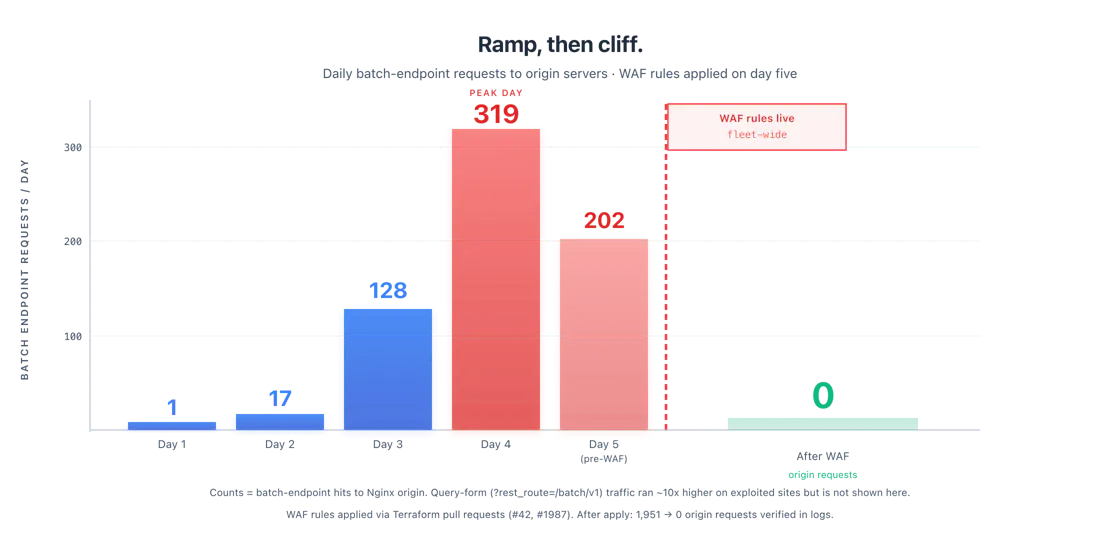
ICA Miami: 1,951 batch requests reached its origin on the day of the block (~1,933 executed) → 0 after. Across the UDX fleet: 301 (164 executed) → 0 on every protected host.

Exactly one attack request arrived after the ICA block went live. It was answered with a 403 at the edge and never touched an origin.

Keep a control group. One site sat on an ACL the change did not cover, and it kept returning 207s to attack traffic for hours afterward — an accidental control group proving the drop everywhere else was our WAF rule, not the attacker simply going quiet. (Closing that gap is on the follow-up list, alongside the remaining core updates to WordPress 6.9.5.)

One honest footnote: at one point the assistant reported there were no S3 access logs to analyze. There were — the human on the session knew the logging pipeline and corrected it. Verification cuts both ways: check the AI's claims with the same rigor it checks yours.

A Tale of Two Assistants

We ran this incident with two different AI coding assistants at different points, and the contrast is worth documenting — not as a product review, but because it taught us where guardrails actually belong.

Working the same WP2Shell problem in Claude Code, we hit the safety safeguards on Anthropic's frontier model, Fable, 12 times. Eight of those flags landed in a single hour of log analysis: the session would flag a message as cybersecurity-related — the notice reads, verbatim, “Fable's safeguards flagged this message. The safeguards are intentionally broad right now and may flag safe and routine coding, cybersecurity, or biology work” — then silently downgrade the session from Fable to a smaller fallback model and wait while we switched it back: six downgrade-and-switch-back loops in under sixty minutes, plus one hard refusal that ended a turn entirely. And what was the dangerous work being flagged? Reading our own CDN logs, measuring our own exposure, and editing our own infrastructure-as-code repository to open a pull request that blocked an active attack on our own sites. That is not a gray area — it is the textbook, industry best-practice way to respond: no ad-hoc console changes, a reviewable PR, plan-only validation. A safeguard that cannot tell the difference between that and malice doesn’t make anyone safer. It just makes the tool useless at the exact moment it matters most.

In Kimi Code CLI, the same class of work — reading attack logs, replaying exploit traffic, writing firewall rules — ran to completion without a single interruption: 323 model steps, roughly 400 tool calls, zero safeguard stoppages, across three working sessions.

The process itself earned its keep here. Because every piece of work lived in a branch, a pull request, and a CI run — not in anyone’s terminal — nothing depended on one machine or one session staying alive. A new session could ask “where is the PR at?” and pick up exactly where the last one stopped. One merge was even approved from a phone, by the human, while the assistant was offline.

The lesson is not that one assistant is good and another is cautious. It is that guardrails belong in the platform, not just the model. Model-level safeguards interrupted defensive work twelve times and stopped nothing dangerous. Platform-level guardrails — no direct cloud access, infrastructure as code, plan-only CI, required review, human-controlled merges — interrupted nothing and made every change safer.

Why This Matters for Your Team

Strip away the AI and what happened here is the textbook senior-SRE incident workflow: measure the exposure from real logs, choose the smallest compensating control, ship it through change management, and prove it worked before declaring victory. Historically that meant paging someone experienced and hoping they were awake.

What has changed is who can execute it. An AI assistant with a CLI can read a gigabyte of logs in minutes, write the rules, open the pull requests, answer the review comments, and re-check the logs afterward — while a human makes the two decisions that actually require judgment: is this the right control? and should we merge? The assistant did the typing; the process did the protecting; the human stayed in charge.

None of that works without the guardrails being in place before the incident:

Infrastructure as code, so every change is a diff that can be reviewed and reverted.
Plan-only CI on every pull request, so “what will this change?” has a factual answer before merge.
No direct cloud access for the assistant — read-only by policy, write-only through Git.
Code review on every change, human and machine.
Log-based verification, so “fixed” means a measured before-and-after, not a feeling.

With those five things in place, an internet-wide WordPress emergency became a two-hour, two-pull-request exercise — most of it spent on verification. Without them, the same AI is just a fast way to make unreviewed changes to production.

This is how we run the WordPress fleets we manage, and it is why WP2Shell was a contained incident for our clients rather than a week of emergency calls. If you would like your sites operated this way, talk to us.

Talk to an Expert

Questions about your WordPress security posture, patching process, or managed hosting? Our team is happy to help.