WP2Shell: What the WordPress REST API Vulnerability Means for Your Business
In mid-July 2026, security researchers disclosed a vulnerability chain in WordPress core nicknamed WP2Shell, short for "WordPress to shell." Working exploit code was public within hours. Attackers were using it in the wild within days.
WordPress powers roughly four in ten websites on the internet, so a flaw in WordPress itself, not in a plugin or a theme, is about as serious as web security news gets. WordPress.org treated it that way, shipping an emergency security release and pushing it to affected sites through forced auto-updates.
Here is what happened, in plain language, and what it means for your business.
WordPress powers roughly four in ten websites on the internet, so a flaw in WordPress itself, not in a plugin or a theme, is about as serious as web security news gets. WordPress.org treated it that way, shipping an emergency security release and pushing it to affected sites through forced auto-updates.
Here is what happened, in plain language, and what it means for your business.
What Is WP2Shell?
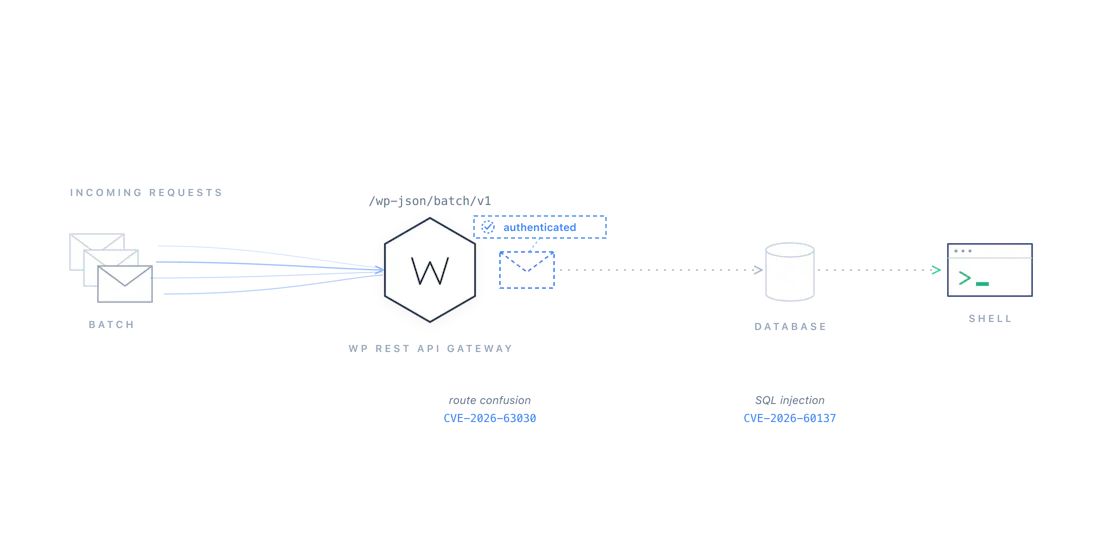
WP2Shell is not one bug but two, both in WordPress core, that become dangerous when combined.The first (CVE-2026-63030) is a mix-up in the WordPress REST API, the interface sites use to move data in and out. Under specific conditions, a request from an anonymous visitor can be processed as if it came from a logged-in, privileged user.
The second (CVE-2026-60137) is a SQL injection flaw, a way to smuggle commands into the database queries WordPress runs behind the scenes.
On its own, each flaw has limited reach. Chained together, they let a complete stranger walk up to an unpatched site, read credentials out of its database, create an administrator account, install a plugin, and run their own code on the server. That is the "shell" in WP2Shell.
Where the Vulnerability Lives
Both flaws sit in specific, well-known parts of WordPress core, which is why the fix could be surgical and why checking your own exposure is straightforward.The front door is the REST API's batch endpoint (
/wp-json/batch/v1). It exists so applications can bundle several API calls into a single HTTP request, and it has been part of WordPress since version 5.6. In the 6.9 release line, a regression changed how the server pairs each bundled sub-request with its handler: when one sub-request fails, the pairing shifts, and a later request can be handled under privileges it was never granted.
Through that door, attackers reach the second flaw: a post-query filter (
author__not_in, exposed through the REST API as author_exclude) that fails to sanitize its input before it reaches the database. That injection point has existed since WordPress 6.8.
How the chain fits together: a route confusion in the batch endpoint opens the door; SQL injection does the work; the end result is a remote shell on the server.
Whether your site is affected comes down to your WordPress version:
| WordPress version | Exposure | Fixed in | Fix released |
|---|---|---|---|
| 6.7.x and earlier | Not affected | No action needed | |
| 6.8.0 to 6.8.5 | Database injection only | 6.8.6 | July 17, 2026 |
| 6.9.0 to 6.9.4 | Full takeover chain | 6.9.5 | July 17, 2026 |
| 7.0.0 to 7.0.1 | Full takeover chain | 7.0.2 | July 17, 2026 |
All three fixed versions shipped on the same day as emergency security releases, with WordPress.org pushing them to affected sites through forced auto-updates.
One technical footnote: the full takeover path works on sites running WordPress in its stock configuration, without a persistent object cache. In other words, a default install.
How to Check Whether Your Site Is Exposed
Start with the version number. In wp-admin, the WordPress version shows on the Updates screen and in the footer of most admin pages; on the command line,wp core version tells you instantly. If you are on 6.8.6, 6.9.5, 7.0.2 or later, you are patched.
If you want independent confirmation, the researchers who discovered the flaw (Searchlight Cyber) operate a free checker at wp2shell.com. For security teams, a defensive detection template for the open-source nuclei scanner was published alongside the disclosure. It confirms exposure with a timing-based check rather than extracting any data. Only ever run security tests against systems you own or have explicit permission to test.
If you cannot patch immediately, the stopgap is to block access to the batch endpoint at your application or CDN layer. Cloudflare deployed managed rules for both flaws across all plans, including free ones. A block buys time; it is not a fix.
Finally, and this is the part most coverage skips: patching does not evict an attacker who got in before you patched. If your site sat unpatched during the exploitation window, audit it. Look for administrator accounts you do not recognize, plugins or must-use plugins you did not install, and unexpected files in
wp-content/uploads.
If You Cannot Update: Blocking the Batch Endpoint
"Just block the endpoint" is easier said than done, because it answers to two addresses:/wp-json/batch/v1 and ?rest_route=/batch/v1. Here are two practical ways to cover both, one in WordPress itself and one at the edge.
Option 1: a must-use plugin (PHP). Drop a single file into
wp-content/mu-plugins/, for example block-rest-batch.php. Must-use plugins load automatically on every request, with no activation step and no way to disable them from wp-admin:
block-rest-batch.php
<?php
/**
* Plugin Name: Block REST Batch Endpoint (WP2Shell stopgap)
* Description: 403 for anonymous requests to the REST API batch
* endpoint. Remove after updating to 6.8.6, 6.9.5, or 7.0.2.
*/
add_filter( 'rest_authentication_errors', function( $result ) {
if ( ! empty( $result ) ) {
return $result;
}
$uri = isset( $_SERVER['REQUEST_URI'] ) ? $_SERVER['REQUEST_URI'] : '';
$rest = isset( $_GET['rest_route'] ) ? $_GET['rest_route'] : '';
$is_batch = ( false !== strpos( $uri, '/wp-json/batch/v1' ) )
|| ( false !== strpos( $rest, '/batch/v1' ) );
if ( $is_batch && ! is_user_logged_in() ) {
return new WP_Error(
'rest_batch_disabled',
'The REST API batch endpoint is disabled on this site.',
array( 'status' => 403 )
);
}
return $result;
} );
The
is_user_logged_in() check matters: the block editor and some admin tooling use the batch endpoint legitimately, so only anonymous traffic is blocked. Verify by requesting /wp-json/batch/v1 in a private browser window; you should get a 403. Delete the file once you are on a fixed version.
Option 2: a CloudFront behavior (edge). Blocking at the CDN keeps the traffic off your server entirely. The path form is a one-minute job with a CloudFront Function:
- In the CloudFront console, go to Functions and create a function (viewer request type) that simply refuses the request:
viewer-request.js
function handler(event) {
// Attach (viewer request) to a behavior with
// path pattern /wp-json/batch/v1*
return {
statusCode: 403,
statusDescription: 'Forbidden',
body: { encoding: 'text', data: 'The batch endpoint is disabled.' }
};
}
- Open your distribution, go to Behaviors, and create a new behavior with path pattern
/wp-json/batch/v1*, above the default behavior, pointing at your normal origin with your normal cache policy. - Under Function associations on that behavior, attach the function as a viewer request function and save.
Path patterns do not match query strings, so the
?rest_route=/batch/v1 form needs a second function attached to the default behavior:
default-viewer-request.js
function handler(event) {
// Attach (viewer request) to the default behavior
var q = event.request.querystring;
var cookies = event.request.cookies || {};
var loggedIn = Object.keys(cookies).some(function(name) {
return name.indexOf('wordpress_logged_in') === 0;
});
if (!loggedIn && q.rest_route && q.rest_route.value.indexOf('/batch/v1') === 0) {
return {
statusCode: 403,
statusDescription: 'Forbidden',
body: { encoding: 'text', data: 'The batch endpoint is disabled.' }
};
}
return event.request;
}
The cookie check keeps the endpoint working for your logged-in editors while refusing anonymous traffic, and requests that do not match pass through unchanged. Once WordPress is updated, detach both functions and remove the extra behavior.
Patch Speed Is an Operations Problem
When the disclosure broke, the difficult part was not understanding the advisory. It was knowing immediately which sites were exposed, which already had compensating controls, and how quickly a control could be put in front of the rest.We pulled five days of CDN logs and counted: over 25,000 attack requests across eight properties, nearly 15,000 of them executed by the vulnerable endpoint. A coordinated core update across every site takes time, so the same-day move was a surgical block at the edge — two WAF rules covering both forms of the endpoint, shipped through ordinary infrastructure-as-code pull requests: plan-validated, reviewed, merged, and verified in the logs. From first commit to enforcement across the fleet took 38 minutes, and origin traffic to the endpoint dropped to zero. The core updates then rolled through the normal release channel behind the block.
One detail most coverage missed: the batch endpoint answers to two addresses, and roughly 99% of the real attack traffic we observed used the query-string form. A block that only covers the path form misses almost everything.
The full play-by-play — the log data, the two pull requests, and the before-and-after verification — is in our companion piece: Blocking WP2Shell: A Play-by-Play of AI-Driven Incident Response.
That is what managed operations should turn an internet-wide emergency into: an inventory query, a controlled change, and evidence that the change worked—not a week of guesswork.
The Takeaway for Business Owners
Vulnerabilities in WordPress core are rare. Plugin flaws dominate the headlines, but when a core flaw lands, it lands everywhere at once. Three practices turned WP2Shell from an emergency into a non-event for the organizations that had them in place:- Security auto-updates. WordPress patched itself on millions of sites overnight. If you have disabled auto-updates without a process that replaces them, this is your reminder to re-enable them.
- A WAF or CDN layer, with coverage you have actually checked. Cloudflare deployed managed rules for both flaws across all plans, including free ones. Our own edge needed a custom rule, because the real attack traffic did not look like an attack: a clean IP, a browser user agent, about one request per second, POSTs to a legitimate endpoint. Defense in depth only counts if someone verifies what it actually catches.
- A team or platform that verifies. Patching is only half the job; confirming the fix, and checking whether anyone got in first, is the other half. And hardening that predates the incident pays for itself: one of our own properties logged 136 attack requests with zero executed, because its REST API sits behind authentication.
If you run WordPress and have not confirmed your version since mid-July, do it today. And if you would rather not think about any of this, that is exactly the kind of problem we take off your plate.
Talk to an Expert
Questions about your WordPress security posture, patching process, or managed hosting? Our team is happy to help.