Products
One Operator, Every Site, Straight from Git
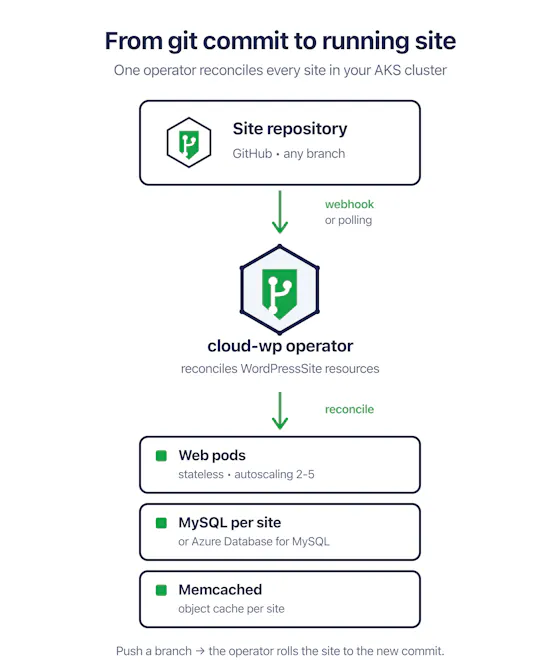
Cloud WP installs once into an AKS cluster you already run. After that a WordPress property is just another Kubernetes resource: name the GitHub repository, name the branch, and the operator takes it from there. It clones the code when the pod boots, generates the credentials and salts, provisions the database and the object cache, and brings the site to Ready without anyone opening a terminal.
Deploys travel the same path. A GitHub webhook tells the operator that a branch has moved and the site rolls to the new commit, with polling standing by whenever a webhook cannot reach the cluster. Because the web pods hold no state of their own, that roll is an ordinary Kubernetes rolling update rather than a maintenance window your team has to schedule around.
Array
Most WordPress platforms make you choose between a managed host that meters every site and a bespoke stack your platform team has to babysit. Cloud WP is the third option: a single operator that treats WordPress the way you already treat everything else in the cluster.
Point a site at a GitHub repository and a branch. Pods clone at boot, and when the branch moves the operator rolls the site to the new commit. A GitHub webhook makes deploys immediate, and polling covers the cases where a webhook cannot reach you. An optional .stateless/site.yaml in the repository keeps each site's tuning next to the code it belongs to.
Push a branch and the operator builds a full preview site with its own database schema. One branch, one environment, which is how staging should have worked all along. Delete the branch and the preview is swept away with it.
Web pods are disposable: code comes from git, configuration comes from the environment, and media is offloaded to object storage. With horizontal autoscaling from 2 to 5 pods, rolling deploys, and pod disruption budgets in place, a node failure stops being an incident.
Per-site MySQL for evaluation or your own Azure Database for MySQL, a per-site memcached object cache, external WP-cron, generated credentials and salts, and an in-cluster dashboard for the web team. No kubectl required.
Set spec.expose and the site gets an Azure public IP and a managed cloudapp.azure.com hostname through an Azure DNS label. Bring your own domain and gateway whenever you are ready.
No per-site subscription treadmill. Cloud WP meters the vCPU core-hours your workload actually runs and bills them through the Azure subscription you already have, so the invoice follows real usage rather than a seat count.
WordPress Hosting Without the Per-Site Treadmill
Managed WordPress hosts meter you per site and per visitor, and your platform team still ends up maintaining a separate snowflake stack outside Kubernetes. Cloud WP retires both problems at once.
- One Platform: Every WordPress property runs in the AKS cluster you already operate, declared as a ten-line Kubernetes resource and managed like the rest of your platform.
- Predictable Economics: Usage-based per-core-hour metering through your Azure subscription replaces per-site and per-visitor hosting invoices.
- Instant Deploys: Push to a branch and the operator rolls the site to the new commit, webhook-fast, with polling as a dependable fallback.
- Previews That Just Work: Every branch gets a full preview environment with its own database schema, swept away automatically when the branch is deleted.
- Your Data, Your Tenant: Sites, databases, and the deploy pipeline stay inside your own Azure subscription and region, which addresses data sovereignty requirements by construction.
A Console the Web Team Can Use Without kubectl
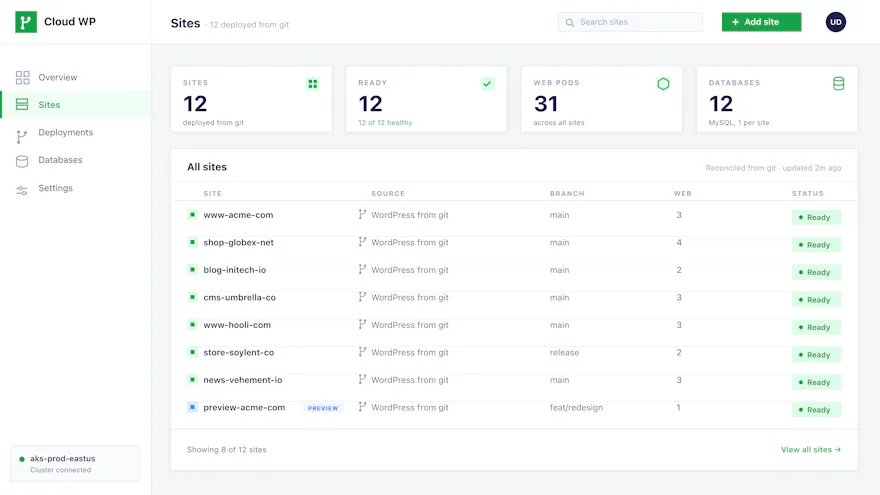
Platform engineers are perfectly happy declaring sites in YAML. Editors, marketers, and the people who actually ship the content are not, and handing them cluster credentials is how good platforms end up with bad access controls. Cloud WP ships an in-cluster dashboard that covers the day-to-day work: which sites exist, which branch each one tracks, how many pods are serving it, and whether it is healthy right now.
From there the team can add a site, force a resync when a webhook was missed, read a site's logs, and retire a site that is finished. Everything on screen is read from the same WordPressSite resources the operator reconciles, so there is no second source of truth to drift out of date. The dashboard is not exposed on the public internet by default, and you decide who reaches it.
Array
Cloud WP is for organizations whose WordPress portfolio has outgrown per-site managed hosting: universities, multi-brand companies, media groups, and agencies with enterprise clients. If your platform team has standardized on Kubernetes and you want WordPress to stop being the exception, this is your operator.
Universities and Higher Education
"Hundreds of department and program sites, one small platform team." Declare each site as a WordPressSite resource, give the web team the in-cluster dashboard, and stop paying a per-site hosting fee for every school and lab.
"Every brand wants its own site, its own repo, its own release cadence." One operator runs them all in your cluster, branch previews included, while brand teams deploy by pushing to git.
"Traffic spikes should be boring." Stateless web pods autoscale from 2 to 5 replicas behind a pod disruption budget, and external WP-cron keeps scheduled work off the request path.
Agencies with Enterprise Clients
"Clients want their data in their own tenant." Deploy cloud-wp into the client AKS cluster, keep every site and database inside their subscription, and hand over a dashboard instead of kubectl access.
If you run one or two WordPress sites, a shared host or a single managed plan is cheaper and simpler, and you should use one. If your organization has no Kubernetes cluster and no platform team to run one, start there first. Cloud WP pays off when the portfolio is large and Kubernetes is already home.
Questions We Get Asked
Does Cloud WP need its own Kubernetes cluster?
No. Cloud WP installs once into an AKS cluster you already operate. It is a Kubernetes operator, not a hosting platform, so it runs alongside whatever else your platform team already has in the cluster.
How does a site actually get deployed?
You point a WordPressSite resource at a GitHub repository and a branch. Pods clone the code at boot, and when the branch moves the operator rolls the site to the new commit. A GitHub webhook makes that immediate, and polling covers the cases where a webhook cannot reach the cluster.
What happens to a branch preview when the branch is deleted?
It is swept away automatically. Every branch preview gets its own database schema and credentials while it exists, so previews never share state with the parent site, and deleting the branch removes the environment with it.
How is Cloud WP billed?
Per vCPU core-hour of running workload, metered through Azure and billed on the Azure subscription you already have. There is no per-site or per-visitor subscription, so the invoice follows what you actually run.
Does the web team need kubectl access?
No. Cloud WP ships an in-cluster dashboard covering the day-to-day work: adding a site, forcing a resync, reading a site's logs, and retiring a site that is finished. The dashboard is not exposed on the public internet by default, and you decide who reaches it.
Where do the sites and databases live?
Inside your own Azure subscription and region. Sites, databases, and the deploy pipeline never leave your tenant, which is what makes Cloud WP workable for organizations with data sovereignty requirements.
Talk to Us About Cloud WP
Tell us how many WordPress properties you run and what your cluster looks like today. We will tell you honestly whether Cloud WP is a fit, and what it would take to move your portfolio onto it.
WordPress is a registered trademark of the WordPress Foundation. Cloud WP is an independent product for WordPress and is not endorsed by or affiliated with the WordPress Foundation or Automattic.