Your Branch Name Is Your Deployment Policy
Which branches deploy where, which environments are disposable, who can touch production - every engineering team has this map, and almost none have written it down. Ours is a twelve-line YAML file the pipeline reads and enforces on every push. Here is how it works, and what it refuses to do.
Talk to an EngineerThe Environment Map That Lives in Someone's Head
Every engineering organization runs on an unwritten map: which git branches feed which environments, which environments are precious and which are disposable, who is allowed to change production and by what path. The map is real - people navigate by it every day - but it usually lives in the heads of two or three senior engineers, in runbook fragments, and in the muscle memory of whoever set up the CI pipeline years ago. When those people are on vacation, deployments wait. When they leave, the organization rediscovers its own topology one outage at a time.
An unwritten map has a second cost: environments outlive their reasons or never get born at all. Some teams keep a full-size staging cluster running around the clock because nobody remembers what is safe to turn off, and the cloud bill quietly absorbs it. Others swing the opposite way and run production only, because standing up anything else feels like a project. We are not lecturing from a pedestal here: the repository that deploys our own Kubernetes platform spent a long stretch with exactly one fully populated environment directory, and it was production. We got away with it because we deploy the same way hundreds of times a month. Getting away with it is not a policy.
We have written about giving every branch of a static site its own preview URL and about doing the same for dynamic sites with a running replica per branch. This piece is about the layer underneath both: the policy that decides what a branch is entitled to. It fits in the file below - twelve lines - and the pipeline enforces it on every push.
One File, Three Verbs
Each key under lifecycles names a directory in the repository - .rabbit/infra_configs/production/, .rabbit/infra_configs/staging/, and so on - holding the infrastructure YAML for that stage. The three properties are the entire vocabulary. protected_only marks the lifecycle that only a protected branch may claim. is_fallback marks the lifecycle that absorbs everything unmatched. allow_subdirs declares whether a lifecycle may hold per-environment subdirectories, so ten development branches can carry ten distinct environment configurations without touching each other.
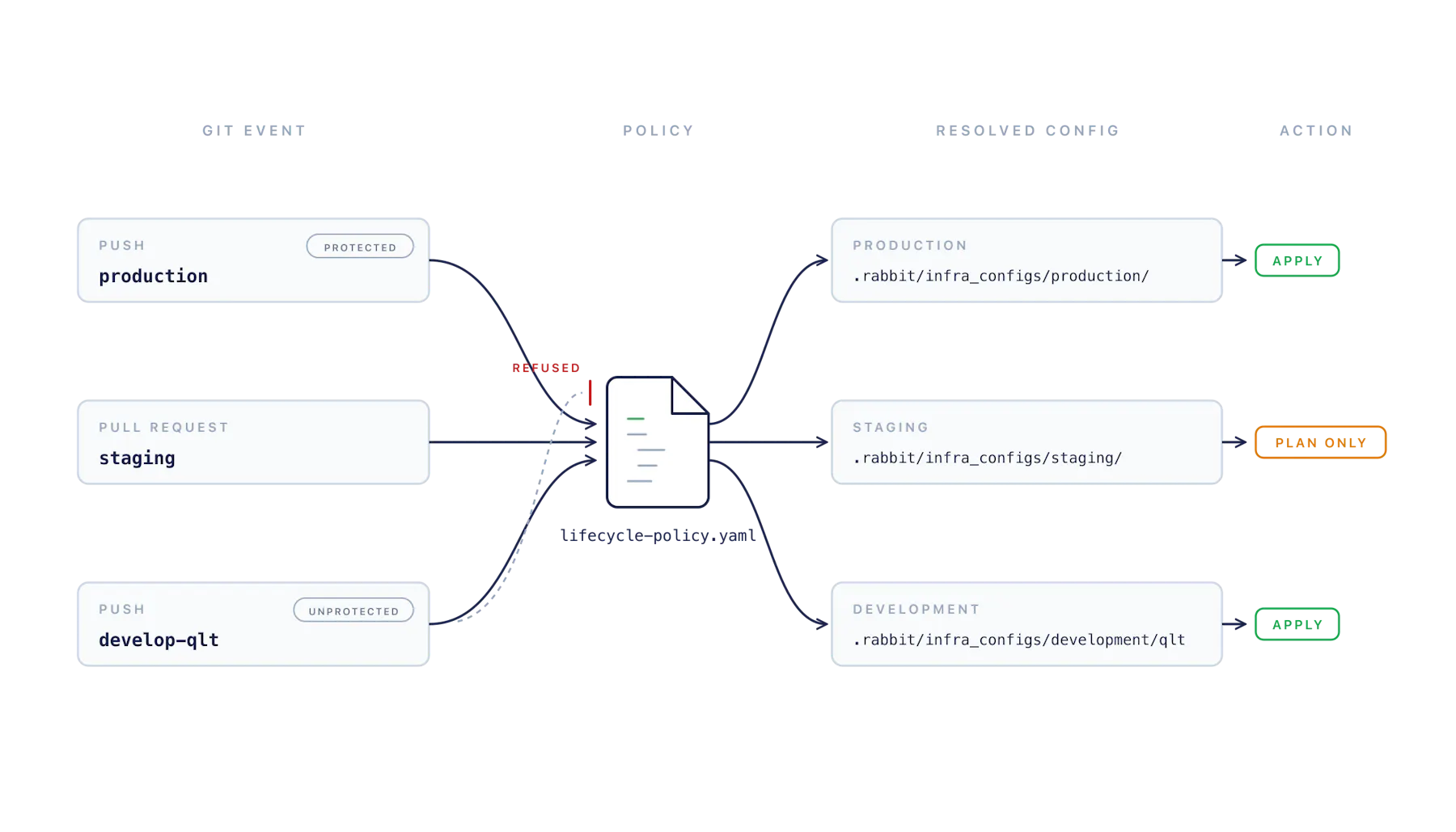
Resolution runs in that order of specificity. A branch whose name exactly matches a lifecycle claims it: push to staging and you are in the staging lifecycle. Anything else triggers the interesting question - the pipeline asks GitHub, live, whether the branch has branch protection enabled. Protected branches resolve to the production lifecycle. Everything else falls through to development, where develop-qlt, fix-header, and a contractor's weekend experiment each get their own isolated environment automatically.
Notice what this design refuses to create: a second permission system. Nobody types an environment name into a deploy form, and no script carries a --production flag waiting to be fat-fingered. To ship production configuration you must be able to merge into a protected branch, which your organization already governs with required reviews and code owners. The policy file does not grant access; it inherits the governance git already enforces.
"Hey R2A, Deploy Configs From This Directory"
The policy is enforced by a composite action - udx/github-rabbit-action, published on the GitHub Marketplace - that runs on every push, pull request, and branch deletion. It reads the git ref, resolves the lifecycle against the policy, selects the matching configuration directory, and merges every YAML file inside it into a single deployment manifest. Teams keep concerns in separate files - the CDN in one, the Kubernetes deployment in another, monitoring in a third - and the merge step assembles them per environment.
The merged manifest is handed to a container we call R2A, the Rabbit Automation Action image, which runs OpenTofu against your cloud. State backends cover Google Cloud Storage, S3, Azure, HTTP, and Consul, so the same mechanism deploys to whichever cloud the repository targets. By the time the infrastructure engine starts, every ambiguous question - which branch, which environment, which lifecycle, which directory - has already been answered upstream. The instruction that reaches it is almost conversational: this is the production branch, this is the production environment, this is the production lifecycle, deploy this directory.
The action is public and free, and that is deliberate. The mechanism is not the moat, and a deployment tool you cannot inspect is a deployment tool you cannot trust. What is worth paying for - we will get there - is deciding what your organization's version of that twelve-line file should say.
Gates That Do Not Take Exceptions
A policy that can be overridden under pressure is not a policy; it is a suggestion with paperwork. So the consequential rules are structural, built into the pipeline itself rather than into anyone's judgment. Pull requests only ever produce a plan - a diff of what would change - and cannot apply it. Scheduled runs are plan-only as well. Manual runs default to plan, so the reflexive button-press shows you consequences instead of causing them.
Two gates are absolute. A manual apply to production is refused: the only path to production is a merge into the protected branch, with whatever reviews that branch demands. And a destroy of the production lifecycle is refused unconditionally - no input, no actor, no event can request it. Deleting a branch tears down its environment, which is exactly what you want for ephemeral development work, but even deleting the production branch itself would not take production down. The pipeline checks the lifecycle before the engine starts and simply declines.
Our architecture series Deploying with Impunity puts the principle this way: a system that reaches production has, by definition, passed all structural integrity gates - failure to deploy becomes a protective mechanism, not a defect. A refused deployment is not the pipeline getting in your way. It is the pipeline telling you about the incident it just declined to cause. We apply the same gate discipline to database changes, which are production deployments that git cannot see.
Environments You Can Afford to Throw Away
Real organizations run richer lifecycles than development, staging, production. Enterprise release trains carry QA stages, UAT stages, load-and-performance stages, sometimes an alpha channel and two production variants. The reason most teams do not run them is cost: a load-test environment sized to answer real questions - how does the cluster behave at ten containers versus fifty - idles expensively for the twenty-eight days a month nobody is load-testing. So the stage gets skipped, and the sizing questions get answered in production.
When the branch is the environment, that math changes. Hydrate the environment when the release train reaches it, run the tests, and dehydrate it the same day. Deleting a branch destroys its environment by design, but a release-train branch is not something you want to delete - it will be needed again next cycle. So the two operations are separate: the deployment action can be run with a destroy instruction, on a schedule or by hand, tearing down the infrastructure while the branch and its configuration stay in git. Next release, the same push hydrates it again. The environment becomes a verb, not a line item.
And because the policy file lives in each repository, every team owns its own vocabulary. A team that needs a QLT stage copies the staging stanza and renames it - the card below is the entire change. The platform does not care what your stages are called or how many you have; it enforces whatever verbs the file declares. That is what makes the mechanism reusable across organizations whose processes look nothing alike.
The Runtime That Refuses to Run Broken Software
Everything so far happens before any infrastructure changes. The same philosophy continues inside the container after deployment, because our workloads - and the R2A deployment engine itself - run on Worker, a public base image whose defining behavior is that it never executes what is broken. Every deployment has to prove its readiness before execution, with no exceptions.
At startup, before a single line of application logic runs, Worker validates its declared configuration and resolves its secret references. Secrets are declared in worker.yaml as references into AWS, Azure, or Google Cloud secret managers, so no secret value ever lives in git, in the image, or in a Kubernetes manifest. If a reference fails to resolve - a typo, a missing entry, a permissions gap - the container halts. It does not start in a degraded mode, and it does not signal readiness to the orchestrator, which means Kubernetes never routes traffic to it and the previous version keeps serving. A broken release cannot replace a working one, because the broken release refuses to stand up.
This is the same principle Toyota built into its production lines decades ago: the machine detects the abnormality and stops itself rather than letting the defect propagate. A failed startup is not an outage - it is information, delivered before customers could be affected. And because the same image runs anywhere Docker runs, the validation your laptop performs is byte-for-byte the validation production performs. Any app, anywhere, with the same refusals.
Evidence, Not Assurances
Regulated organizations eventually ask the question that unravels most delivery pipelines: what, exactly, is running? Traditionally the answer is assembled by hand - interviews, spreadsheet inventories, an audit that is stale before it is signed. Worker answers with evidence the system generates about itself. Every release is immutable and ships with an sbom.json - a software bill of materials - attached to it, and the running container can produce and check one on demand: worker sbom generate inventories every installed package with its version, and worker sbom verify confirms the installed reality still matches the manifest.
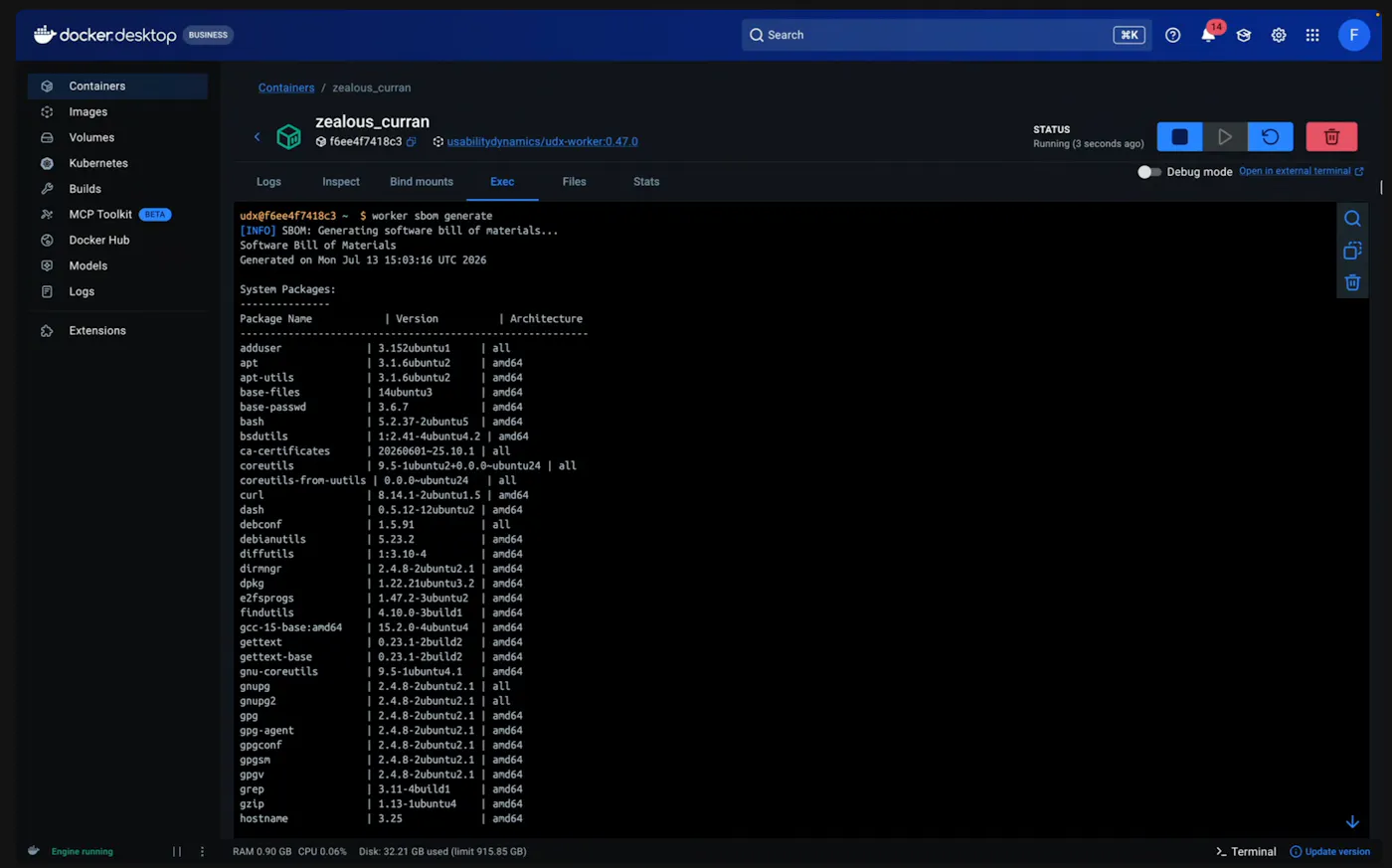
The same property solves a problem most security programs discover late: the developer workstation. In locked-down organizations - government, finance, anyone on a compliance path - installing a single CLI tool means a ticket, an approval, and a wait, multiplied across every engineer and every tool. Hand the team a Worker-based image instead and the toolbox is pre-approved once: public, scannable, identical on a laptop to what CI runs, with every tool living and dying inside the container boundary. The security team audits one transparent image instead of fifty laptops, and the SBOM tells them what is in it without asking anyone.
When You Do Not Need This
If you run one production environment and a hosted platform such as Vercel or Netlify already gives you preview deployments, you have the parts of this that matter most, and a lifecycle policy would be ceremony. The same is true for a single service on a single VM where deployment is an SSH session and a restart: writing a twelve-line policy for a one-line process inverts the economics. Honest simplicity beats ambitious scaffolding, and we have told more than one prospect to keep what they have.
The signals that you have outgrown the unwritten map are specific. More than one team touches infrastructure. Idle staging capacity is a visible line in the cloud bill. An auditor asks who can change production and the answer requires a meeting. An incident report contains the phrase "applied to the wrong environment." Or onboarding an engineer requires a verbal tour of which branches are magic. Any one of these means the map has become load-bearing - and load-bearing things should be written down and enforced by machines.
Ten Lines of YAML, Years of Scar Tissue
The policy file is almost embarrassingly small, and that is precisely the point. It is the residue of every hard question an organization ever answers about delivery: what counts as production, who may create environments and who may destroy them, which stages exist because they earn their keep and which exist because nobody canceled them. Writing it forces the conversations that unwritten maps let everyone avoid - with QA about what they actually verify, with SRE about what they will defend, with product about what a release train really needs. Ten lines take an afternoon to type and a career to know.
Everything mechanical on this page is free and public: the deployment action is on the GitHub Marketplace and the Worker image is on Docker Hub with its bill of materials attached to every release. What cannot be downloaded is the mapping of your organization's delivery reality into that file. That is the work we do: sit with your teams, extract the map from the heads it lives in, encode it as policy the pipeline enforces, and hand ownership back. If your environment map still lives in someone's head, tell us about it below - the first conversation is the one where you find out how many lifecycles you actually have.
Array
The delivery practice this page belongs to, one layer at a time.
Preview Environments for Dynamic Sites
The environments this policy creates and destroys: a running replica per branch, server and database included.
When a Data Change Is a Production Deployment
The same gate discipline applied to the half of production that lives in the database.
The GitOps automation platform that runs our repositories, gates, and environments.
"
Talk to an Expert
Connect with our diverse group of UDX experts that can help you implement successful DevOps practices within your organization.